A HubSpot website has three costs: the HubSpot subscription, the build, and the running costs after launch. Price guides often quote one of them and leave out the rest. This one covers all three, using HubSpot's own price list, the HubSpot Template Marketplace, and the prices agencies and freelance platforms publish, all checked in October 2026.
The short answer: a HubSpot website can cost nothing but the domain. HubSpot's free tools host up to 30 pages and a blog of up to 100 posts on your own domain, with HubSpot branding on the site, and 261 themes on the Marketplace are free. Removing the branding takes Content Hub Starter at $240 a year. A site on a paid theme that someone sets up for you costs around $1,000 to $2,000 in its first year. A site on Content Hub Professional with a custom build starts in the low five figures for the first year, because the subscription alone is $6,000 a year.
The three parts of the cost
- The subscription. Free, or Content Hub, HubSpot's paid website product, billed monthly or yearly. Hosting comes with both, so there is no separate hosting bill.
- The build. A theme from the HubSpot Template Marketplace, a theme plus someone to set it up, or a theme designed and coded for you.
- Running costs. The domain, extra seats for your team, and the changes you will want after launch.
What HubSpot charges
These are the list prices in HubSpot's Product & Services Catalog, the document that sets out what each plan includes. The free column comes from the free tools section of the same catalog.
| Free | Starter | Professional | Enterprise | |
|---|---|---|---|---|
| Price | $0 | From $20 a month per seat | From $500 a month | From $1,500 a month |
| Seats included | — | 1 | 3 | 5 |
| Extra seats | — | $20 a month each | $50 a month each | $75 a month each |
| Website pages | 30 | 30 | 10,000 | 10,000 |
| Blog posts | 100 | 10,000 | 10,000 | 10,000 |
| HubSpot branding on the site | Yes | No | No | No |
| Root domains | 1 | 1 | 1 | Core domain plus 9 |
| HubDB and dynamic pages | No | No | Yes | Yes |
| Smart content and A/B tests | No | No | Yes | Yes |
| Members-only pages | No | No | 2 access groups | 100 access groups |
| Serverless functions | No | No | No | Yes |
Every plan, the free one included, comes with hosting on your own domain, an SSL certificate, a content delivery network, a web application firewall and security monitoring. The free plan also allows 30 landing pages on top of the 30 website pages. What it does not allow is removing the HubSpot branding or changing the favicon.
Which plan you need comes down to three questions:
- Can the site carry HubSpot branding? If yes, and you will publish fewer than 100 blog posts, the free plan covers it. If not, Starter is the cheapest plan without it.
- Will you have more than 30 pages? Blog posts do not count towards that limit, since the blog is its own tool. Service pages, location pages and landing pages do.
- Do you need content that comes from data? Property listings, a team directory, an event list or location pages generated from a table all run on HubDB and dynamic pages, which start at Professional. So do personalized content, A/B tests and pages for logged-in members.
If the last two answers are no, Free or Starter covers the site.
Onboarding fees. HubSpot's catalog lists required one-time onboarding for Marketing Hub Professional ($3,000) and for Sales Hub and Service Hub Professional ($1,500). The Content Hub table lists no onboarding fee. If you buy Content Hub together with another hub, onboarding can add $1,500 to $7,000 to the first year, so ask for that line on the quote before you sign.
Buying from Europe, the Middle East or Africa. Since 1 October 2026, HubSpot has sold new customers in those regions a single seat-based plan. Seats start at €20 a month on Starter, €100 on Professional and €175 on Enterprise, and onboarding is required on Professional and Enterprise. The rules are in HubSpot's pricing supplement. Check hubspot.com/pricing from your own country before you budget, because the page shows the prices for where you are.
HubSpot also runs new-customer discounts on Starter from time to time. The figures in this post use list prices.
What the build costs
There are three ways to get the site itself. The price gap between them is wide, so pick the route first and the budget follows.
1. A Marketplace theme you set up yourself
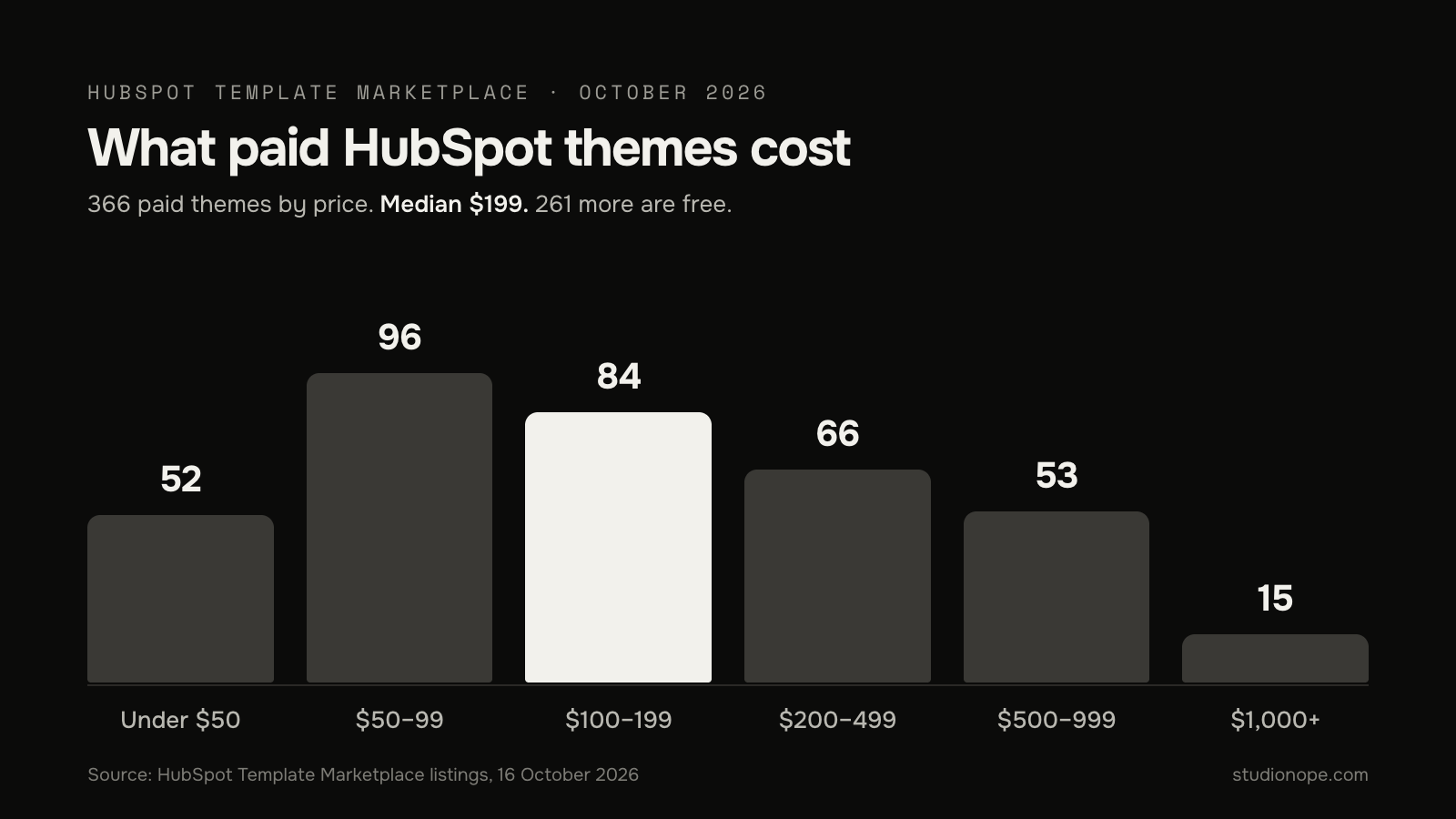
The HubSpot Template Marketplace lists 627 website themes. 261 are free. Of the 366 paid ones, the median price is $199, and the middle half sit between $99 and $399. 68 cost $500 or more, and 15 cost $1,000 or more. You pay once, and the theme installs straight into your HubSpot account.
If a theme is missing a section you need, the Marketplace also sells single modules. Of 1,076 paid modules, the median price is $23.99, and almost all cost $50 or less.
The cost on this route is your time. A theme ships with page templates and sample content, and you replace the text, the photos, the colors and the fonts. A theme built for your industry saves the most work, because its pages already match what your visitors look for. How to pick a HubSpot theme covers what to check before you buy.
2. A theme plus someone to set it up
You buy the theme and pay a person to install it, bring in your content and fit it to your brand. Prices for this depend on who does it:
- Freelancers. Upwork's own figure for HubSpot experts on its platform is $15 to $40 an hour, based on past contracts worldwide. The figure covers every kind of HubSpot work on the platform.
- HubSpot agencies. On Clutch's directory of HubSpot firms, the most common hourly rate among the firms on its first page is $100 to $149.
- Fixed-price setup. One HubSpot partner publishes theme setup and customization from $1,200. Our own Theme + Launch, where we install the theme, configure it and move your content in, is $999 for Tickmark and $1,999 for Lumen, theme included.
Ask what "setup" includes before you compare quotes. The work that takes the time is moving content across and redirecting old URLs, and some quotes leave both out.
3. A custom build
A custom build means the theme is designed and coded for your site: your layouts, your modules, your page types. These are prices HubSpot agencies publish on their own sites:
- A five-page site for $2,500, and a 15-page site with custom modules and templates for $5,500, from a studio in India.
- Onboarding, migrations and custom builds starting at around $5,000, from a HubSpot partner.
- Migrations from $15,000, redesigns from $20,000 and enterprise sites from $75,000, from a US agency.
- Template builds at £4,000 to £8,000 and custom builds at £15,000 to £40,000 and up, from a UK agency, published in 2025.
For a wider view, Clutch's web design pricing survey, which covers all platforms, puts the average project at $38,105 and says most projects cost less than $10,000. The average sits that high because a small number of large projects pull it up.
Our custom theme development starts from €8,000 and most themes take eight to sixteen weeks. Moving a WordPress site of up to 15 pages onto an existing theme starts from €6,000 and takes three to six weeks; the migration page has the details.
Running costs after launch
- The domain. A .com costs about $11 a year to register at mainstream registrars, and around $18 to renew at some. HubSpot connects to the domain you already own.
- Hosting. Included in the subscription.
- Seats. Each person beyond the seats in your plan who works in the paid Content Hub tools needs one: $20, $50 or $75 a month depending on the plan.
- Changes. New pages built from your existing templates cost nothing extra. A new kind of section, an integration or a redesign is development work, billed at the rates above.
- Images. Your own photos cost nothing to license. Stock libraries charge per image or by monthly plan, so budget for them if your theme's demo photos need replacing and you have none of your own.
First-year totals for four common sites
These add up the list prices above for a site with one editor. Your quote will differ, but the order of magnitude holds.
| Site | Subscription, year one | Build | First-year total |
|---|---|---|---|
| Brochure site and blog on the free plan and a free theme, set up yourself | Free, $0 | $0 | The domain only, about $11 to $18 a year |
| Brochure site and blog, set up yourself on a median-priced theme | Starter, $240 | $199 | About $450, plus the domain |
| Brochure site and blog, theme set up for you | Starter, $240 | $999 to $1,999 | About $1,250 to $2,250 |
| Site with listings, a resource library or members-only pages | Professional, $6,000 | $5,500 to $20,000 | About $11,500 to $26,000 |
From year two, the build cost drops out and the subscription stays. Over three years, the third site costs $18,000 in subscription alone, so the choice between Starter and Professional moves the total more than the build price does.
What moves the price
- The number of page types. Ten pages built from one template cost far less than ten pages that each need their own layout. Count the distinct page types first.
- Custom modules. Every section that does not exist in a theme or on the Marketplace has to be built and tested. Calculators, filters and anything that reads from HubDB take the longest. Our guide to building a custom module shows what that work involves.
- Migration. Moving an existing site means mapping every old URL to a new one, so search traffic carries over. Moving a WordPress site to HubSpot covers the steps.
- Content. A quote that assumes your copy and photos are ready is cheaper than one that includes writing them. Check which kind you have been given.
- Languages and domains. Each language version is another set of pages to build and maintain, and more than one root domain needs Enterprise.
How to spend less without ending up with a worse site
- Start on the free plan if HubSpot branding on the site is acceptable. Upgrading to Starter later removes it from the same site, with nothing to rebuild.
- Move to Starter if you need the branding gone and have fewer than 30 pages and no listings. Moving up to Professional later does not require a rebuild.
- Start from a theme made for your industry. The page list, the sections and the sample copy are already close to what you need, so the setup is mostly replacing content. Our HubSpot themes are built this way, one per industry.
- Buy a module before you commission one. At a median of $23.99, a Marketplace module costs less than an hour of agency time.
- Write the content before the build starts. When copy arrives late, the build waits for it.
Frequently asked questions
Can I build a HubSpot website for free?
Yes. HubSpot's free tools let you publish up to 30 website pages, 30 landing pages and a blog of up to 100 posts on your own domain, with hosting and SSL included. The site carries HubSpot branding and you cannot change the favicon. 261 Marketplace themes are free, so the only cost is your domain.
Do I pay separately for hosting?
No. Hosting, the SSL certificate and the content delivery network come with every Content Hub plan.
Is Content Hub Starter enough for a business website?
For a site with up to 30 pages and a blog, yes. It does not include HubDB, dynamic pages, smart content, A/B testing or members-only pages, so if you need any of those, plan for Professional.
Do I need a developer to change my site after launch?
Not for content. Text, images, new pages from existing templates and the theme's colors and fonts are all edited in HubSpot's page editor. You need a developer when you want a section or behaviour the theme does not have.
Why do agency quotes for the same site differ so much?
Because they price different work. Compare the number of page types, whether content and migration are included, and whether the theme is custom or from the Marketplace. Two quotes are comparable when those match.
Getting a number for your site
If you are weighing a Marketplace theme against a custom build, start with the themes and their live demos, and see how close one gets to what you need. If it gets close, the theme route will cost a fraction of a custom build. If it does not, our custom theme development page sets out how a custom build works.
For a fixed quote, write to hello@studionope.com with your current site, the pages you need, and anything that has to come from data. You get the scope and the price in writing before any work begins.