
Pricing Calculator Pro for HubSpot CMS
HubSpot Pricing Calculator Module with Interactive Billing Toggle & Tiered Plans
A premium HubSpot pricing calculator module with billing toggle, quantity slider, tiered pricing cards, add-on selectors, estimated cost calculator, and collapsible feature comparison table — all in one interactive pricing module for HubSpot with 90+ style controls and built-in analytics.
Get the Module Works with any HubSpot CMS theme · Pure vanilla JavaScript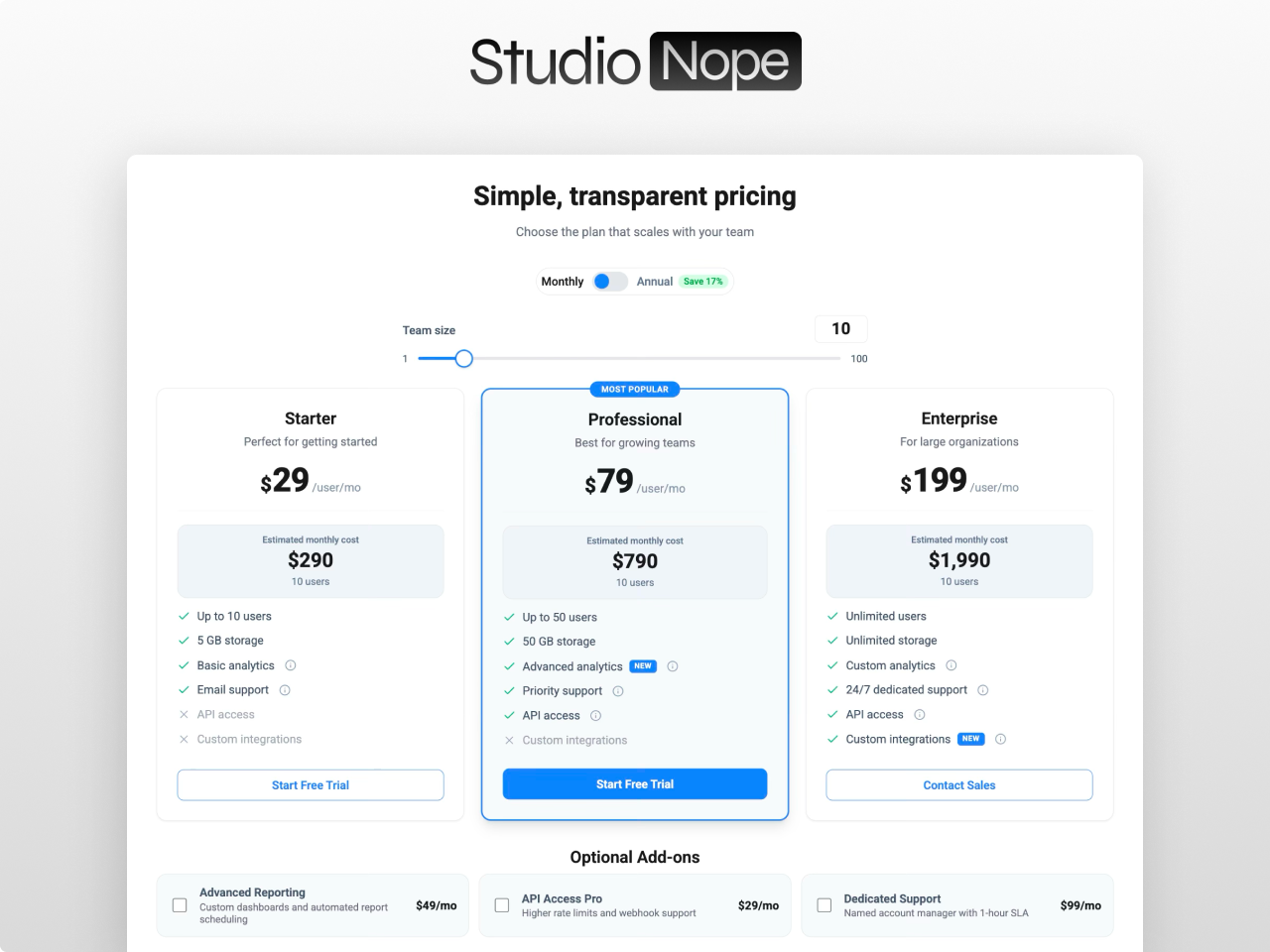
Everything you need in a pricing page
Live Pricing Calculator
Real-time price calculation as visitors adjust quantity via the draggable slider or number input, toggle billing periods, and select add-ons. Three pricing modes — per-unit, volume-tiered breakpoints, and flat — cover every SaaS and service business model.
Billing Toggle with Discount Badge
Animated switch between two pricing options (monthly/annual or any custom labels). Optional discount badge positionable above, inline, or below the toggle. Smooth transition between price sets with optional counting animation.
5 Layout Modes
Display 1 to 5 columns with automatic responsive collapsing. Single-column renders a compact horizontal row layout. Set gap to zero for stacked mode — cards merge into a unified comparison panel with shared borders and dividers.
Add-On Selectors
Checkbox-based add-on items with icons, descriptions, and pricing. Each add-on can be flat-rate or per-unit priced. Add-ons feed directly into the estimated cost calculation with live breakdown formulas.
Feature Comparison Table
Collapsible feature comparison across all tiers with categorized rows, check/cross icons, sticky headers, and horizontal scroll on mobile. Opens and closes with an animated chevron trigger.
Built-In Event Analytics
Automatic event tracking for slider changes, toggle switches, add-on selections, and CTA clicks. Events push to Google Tag Manager (dataLayer), HubSpot behavioral events (_hsq), and custom DOM events.
CTA Parameter Passing
CTA buttons can append the visitor's selections — plan, billing period, quantity, and add-ons — as URL parameters. Checkout or signup pages pre-fill configuration automatically from the pricing page.
90+ Style Controls
Full visual control over cards, badges, buttons, toggle, slider, add-ons, comparison table, tooltips, estimated cost boxes, and responsive breakpoints. Colors, typography, spacing, shadows, hover states, animations — nothing is hardcoded.
What you can build
Four ways teams use Pricing Calculator Pro to convert visitors on HubSpot.
SaaS tiered pricing page
Monthly and annual billing toggle with discount display. Three or four pricing cards with feature lists, CTA buttons, and featured plan highlighting. Add-on checkboxes update the total in real time.
Service business quote calculator
Quantity slider with live cost calculation for per-unit pricing. Add-on selectors for optional services like rush delivery, premium support, or extended warranty. CTA passes selected options via URL parameters to your booking form.
Enterprise plan comparison
Feature comparison table with collapsible categories below the pricing cards. Check, cross, and text values for each feature per plan. CTA buttons route to demo booking or contact sales depending on the tier.
Usage-based pricing estimator
Quantity slider for API calls, users, or storage. Tiered pricing that changes at volume thresholds. Built-in analytics event tracking fires when visitors interact with the calculator, giving your marketing team conversion data.
Works with any HubSpot theme
Pricing Calculator Pro is a standalone module. Install it in any HubSpot CMS portal and drop it on any page. No theme dependency, no jQuery, no external libraries. Pure vanilla JavaScript with zero hardcoded values.
Questions
What pricing models does it support?
addHow does the mobile layout work?
addDoes it track user interactions?
addDo you offer support?
addBuild your pricing page with Pricing Calculator Pro
The most complete interactive pricing module on the HubSpot Marketplace. Billing toggle, quantity slider, add-ons, cost calculator, comparison table, and 90+ style controls.
Get the Module